Showing posts with label SQL Server 2012. Show all posts

Tuesday, July 08, 2014

SOLUTION: SQL Server Management Studio 2012 Hangs after Opening Database Objects like Stored Procedure in Query Window

Today, I have started to experience that SQL Server Management Studio 2012 starts hanging after opening the stored procedure in Query Window. Here is the solution to fix this.


1. Close All Instances of SSMS 2012

2. In Run Command, type "%AppData%\Microsoft\SQL Server Management Studio" and it will open a folder like "C:\Users\{User Name}\AppData\Roaming\Microsoft\SQL Server Management Studio".

3. Rename the "11.0" folder to "11.0.Issue"

4. Open SSMS 2012 and new folder "11.0" would be created in the above path.

5. Open database objects like SP and don't see any hanging in SSMS 2012.

SOLUTION: Keyboard Shortcut not working in SQL Server Management Studio 2012

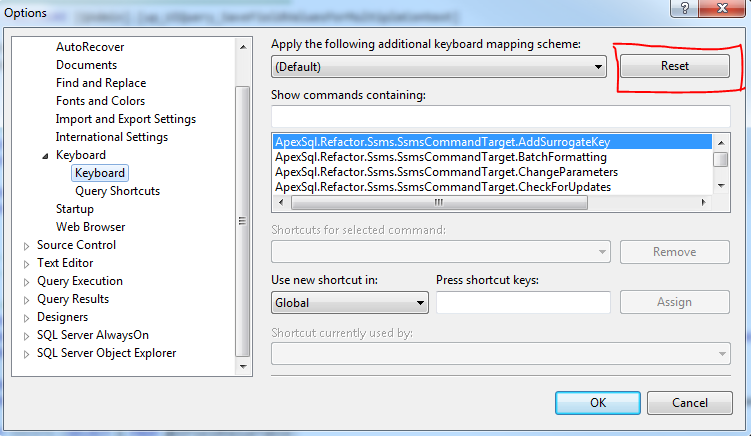
Today, I have started to experience that keyboard shortcuts not working in SQL Server Management Studio 2012. Here is the solution to fix this.


1. Go to Tools  --> Options
2. Select Environment --> Keyboard
3. In Right hand side, click RESET button.
4. Then, Keyboard shortcut works.


Saturday, November 17, 2012

How to create user defined Server Role to manage permissions easily in SQL Server 2012

Until SQL 2008 R2, you don't have option to create user defined server role. In SQL Server 2012, you can create a server role with permissions. It would help easily to manage the login with limited permissions. 


For example, in your company, there are  two teams to manage the front end and back end. Back end team should able to create obejcts and manage database. Front end team should have only access to read and write the records and not allow to create/alter sql objects. To achieve this, you can do either by create login with permissions or by means of server role. It would be easy for you to manage the login with server role with permission set.

Follow the below step on how to create a server role, permissions and logins.

Step1: Create a Server Role.


Step 2: Assigning permissions to server role.


Step 3: After server role created.


Step 4: Create Login with assigning newly created user defined server role.


Tuesday, December 06, 2011

Recovery Models in SQL Server

Here we are going to discuss about database recovery model in SQL Server.

Recovery Models:
1. Simple
2. Bulk Logged
3. Full

Simple Recovery Model:
a)All the operations are not logged in Log file.
b)Log file size won't grow much.
c)Suitable for LOCAL and STAGE Environment.
d)Can't recover the database to certain point in time state.

Bulk Logged Recovery Model:
a)Only minimal information logged in log file during BULK operation. So, its also called as "Minimal Logging"
b)Log File won't grow much during bulk operation.
c)Suitable during bulk operation, migration.
d)Can't recover the bulk operation data.

Full Recovery Model:
a)All the operation logged in log file.
b)Log file size grow rapidly depends upon transactions.
c)Suitable for PRODUCTION environment.
c)Can recover the database to certain point in time (if we followed proper backup plan).

Here is script to switch to different recovery model.
 ALTER DATABASE testdb SET RECOVERY SIMPLE  
GO
ALTER DATABASE testdb SET RECOVERY BULK_LOGGED
GO
ALTER DATABASE testdb SET RECOVERY FULL
GO

Friday, November 25, 2011

SQL Server 2012 - Improved Version of EXECUTE keyword

In Previous version of SQL Server 2005/2008, if you execute the SELECT Stored Procedure using EXECUTE keyword, it will return all the records as it is. if you want to edit the column name and data type of result set, you have to modify the stored procedure respectively.

But in SQL Server 2012, improved version of EXECUTE keyword allows to modify the result set with changing the column name and data type without modifying the stored procedure.

To explore this features, execute the following script to create a table, insert the record and creating the stored procedure.

 CREATE TABLE Customers  
(
ID INT IDENTITY(1,1),
FirstName VARCHAR(50),
LastName VARCHAR(50),
DOB DATE
)
GO
INSERT INTO Customers (FirstName, LastName, DOB)
SELECT 'Ayyanar', 'Jayabalan', '08/12/1982'
UNION ALL
SELECT 'Greg', 'Damico', '08/12/1970'
GO
CREATE PROCEDURE Customers_SelectAll
AS
BEGIN
SELECT
ID,
FirstName,
Lastname,
DOB
FROM dbo.Customers
END
GO


In SQL Server 2005/2008:
 -- SQL 2005/2008  
EXECUTE Customers_SelectAll


RESULT:


In SQL Server 2012:
Here i am changing the column "id" into "CustomerId" and also changing the data type of firstname from VARCHAR(50) to VARCHAR(4). Since i reduced the length of FirstName to 4, it shows truncated firstname value.
 -- SQL 2012  
EXEC Customers_SelectAll
WITH RESULT SETS
(
(
CustomerID SMALLINT,
FirstName VARCHAR(4),
Lastname VARCHAR(20),
DateOfBirth DATE
)
);


RESULT:

SQL Server 2012 - Throwing Exception using THROW in TRY CATCH BLOCK instead of using RAISERROR

In SQL Server 2005/2008, if you want to throw an error again in catch block of TRY CATCH statement, you have to use RAISERROR with ERROR_MESSAGE(), ERROR_SEVERITY().

In SQL Server 2005/2008:
 -- EXCEPTION HANDLING in SQL Server 2005/2008  
BEGIN TRY
DECLARE @VALUE INT
SET @VALUE = 1 / 0
END TRY
BEGIN CATCH
DECLARE @Message nvarchar(4000), @Severity int
SELECT @Message = ERROR_MESSAGE(), @Severity = ERROR_SEVERITY()
RAISERROR ( @Message, @Severity, 1 )
END CATCH


SQL Server 2012:
Just, you can use THROW keyword to throw the complete error information.
 -- EXCEPTION HANDLING using THROW in SQL Server 2012  
BEGIN TRY
DECLARE @VALUE INT
SET @VALUE = 1/0
END TRY
BEGIN CATCH
THROW
END CATCH


if you execute the above statement, you will receive an error like below.
 Msg 8134, Level 16, State 1, Line 5  
Divide by zero error encountered.

Custom Paging in SQL Server 2012 - Using OFFSET

In SQL Server 2005/2008, if you have want to implement the custom paging for ASP.Net GridView or any other controls, you have use either COMMON TABLE EXPRESSIONS with ROW_NUMBER() or just ROW_NUMBER() keyword.

CUSTOM PAGING IN SQL SERVER 2005/2008:

 -- CUSTOM PAGING IN SQL SERVER 2005   
USE AdventureWorks
DECLARE @PageIndex SMALLINT, @PageSize SMALLINT, @StartRowId INT, @EndRowId INT
SET @PageIndex = 1
SET @PageSize = 10
SET @StartRowId = ( (@PageIndex - 1) * @PageSize) + 1
SET @EndRowId = (@StartRowId + @PageSize) - 1
SELECT *
FROM (
SELECT ROW_NUMBER() OVER(ORDER BY EmployeeId) AS RowId, *
FROM HumanResources.Employee) AS TT
WHERE RowId >= @StartRowId and RowId <= @EndRowId


CUSTOM PAGING IN SQL SERVER 2012 using OFFSET:
In SQL Server 2012, by using the OFFSET feature, we can implement the custom paging easily without having too many SQL statements.
Just you have to specify starting row id and page size like below.
 OFFSET <Offset> ROWS  
FETCH NEXT <PageSize> ROWS ONLY;


Here is the complete T-SQL statement for custom paging.
 -- CUSTOM PAGING IN SQL SERVER 2012 RC0  
DECLARE @PageIndex SMALLINT, @PageSize SMALLINT, @Offset INT
SET @PageIndex = 1
SET @PageSize = 10
SET @Offset = ( (@PageIndex - 1) * @PageSize)
SELECT *
FROM HumanResources.Employee
ORDER BY EmployeeId
OFFSET @Offset ROWS
FETCH NEXT @PageSize ROWS ONLY;

Tuesday, November 22, 2011

SQL Server 2012 Features - Sequence Number

Today,i have installed to explore the features of SQL Server 2012. First feature which i am going to discuss is "Sequence Number". You can generate sequence number like identity column. In Previous release, if you want to generate a sequence id before inserting into the table, you have to create a seperate physical table with identity column. Before inserting record into table, we have to insert a row in custom sequence table and get the latest value.

But in SQL Server 2012, you no need to insert record in any physical custom table to retrieve the number in sequence. Just you have to create sequence object which binds to schema.

Here are the steps to create Sequence object using SQL Server Management Studio.

1. Create a New Sequence:


2. Specify the NAME, MIN, MAX, CYCLE and OTHER PROPERTIES:


3. Once you entered the values for sequence object. You have to use following query to get NEXT sequence number using NEXT VALUE FOR keyword.

 select NEXT VALUE FOR dbo.GlobalSequence;  


RESULT:
 1  


If you execute above query, you will get the value as 1. Next time, if you executing same query, you will get the value as 2. Same way, you would get the number in sequential for every execution.

4. With CYCLE OPTION:

 select NEXT VALUE FOR dbo.GlobalSequence;  
select NEXT VALUE FOR dbo.GlobalSequence;


if you execute the above query, you would get values like below.

 1  
2
3
4
5
1


if sequence value reaches maximum value, it will start again with start value if you enabled the CYCLE option. Otherwise, it will throw an error like below;

 The sequence object 'GlobalSequence' has reached its minimum or maximum value. Restart the sequence object to allow new values to be generated.  

Tuesday, October 25, 2011

SQL Server 2012 - Testimonials

http://www.microsoft.com/sqlserver/en/us/future-editions.aspx