Showing posts with label Tips. Show all posts

Thursday, January 16, 2020

Covert blob to string in Javascript to support in IE (Internet Explorer) browser

If you would like to covert stream of bytes (blob) to string in client side, you can easily done with below few lines of code using text() method.

 // Easy way  
 var blb = new Blob(["Lorem ipsum sit"], {type: "text/plain"});  
 var strValue = '';  
 new Response(blb).text().then(t => {  
 console.log(t);  
 });  


Above code does not work in IE browser. if you see below table, you can understand the syntax supported by each browser.


So, above text() method won't work in IE browser. To fix this, we can FileReader to read the blob value. we have to attach "loadend" event to FileReader which will get triggered after read completed. Once read completed, we can get the completed blob object into string. please refer the below code.


 // IE FIX  
 var  blb = new Blob(["Lorem ipsum sit - IE FIX"], {type: "text/plain"});  
 var strValue = '';  
 const readText = (blobString) => {  
  console.log(blobString);  
 }  
 // Since IE not supporting text(), we are using FileReader to convert the blob to string.  
 const showLocalError = this.showError;  
 const reader = new FileReader();  
 // this event get triggered once read from blob is completed. once loadend event triggered, we can retrieve the value.  
 reader.addEventListener('loadend', function () {  
  if (reader && reader.result) {  
      readText(reader.result.toString());  
  } else {  
      console.log('Error in converting blob to string');  
  }  
 });  
 // using readAsText, we are start to reading the blob. Once reading completed, loadend event will get trigged   
 reader.readAsText(blb);  

Saturday, March 02, 2013

Copy your C#/VB Code as HTML or Formatting your C#/VB code into HTML for posting article in Blog's

Usually, when I am writing article with code, I have faced lots of problems on formatting the code into HTML. I used to do the formatting using online codeformatter tools. But its not giving good look and feel. Yesterday,I thought about this while i'm in restroom on why don't we create a plugin in Visual Studio to format the code into HTML. Today, I have just google'd whether anybody created this kind of plugin before for formatting the code into HTML format for blogging. Finally, I found the nice plugin "Copy Source As HTML" .

Here is the list of steps to be followed to experiment this plugin.

1. Download the above plugin and install it for VS 2008/2010/2012.

2. Once you have installed, open the Visual Studio and open any project.

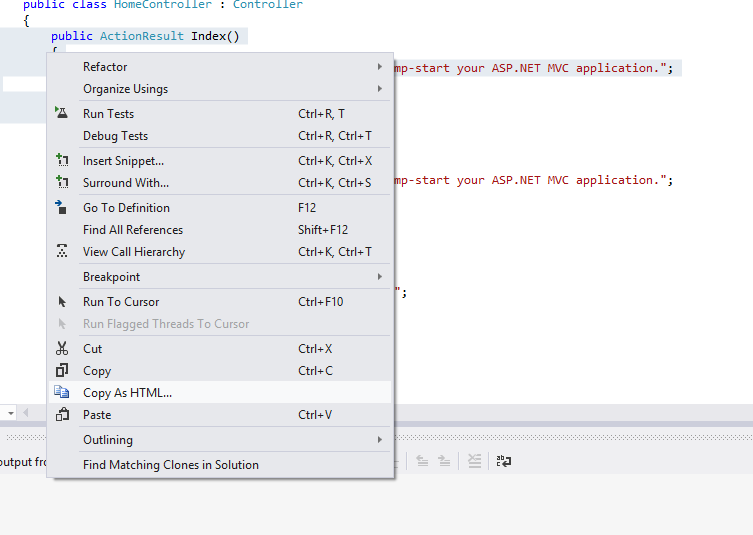
3. Select the code which you want copy as HTML, right click and select "Copy As HTML"

Screenshots:


4. Go the blogger/any other blogging site, paste that code in HTML.

Screenshot:


Formatted Code:


        public ActionResult Index()
        {
            ViewBag.Message = "Modify this template to jump-start your ASP.NET MVC application.";
 
            return View();
        }