Showing posts with label Tips and Tricks. Show all posts

Monday, November 12, 2018

Upgrade angular version from 6 to 7

To upgrade the angular version in your project, please use below commands to upgrade the angular version.


ng update @angular/cli
ng update @angular/core


Friday, November 09, 2018

Fix: TypeError: Cannot read property 'text' of undefined (while using karma-coverage-istanbul-reporter package in angular)

I was getting an below error while running the code coverage in angular project using karma-coverage and karma-coverage-istanbul-reporter packages.


ERROR:

TypeError: Cannot read property 'text' of undefined
    at {ApplicationPath}\node_modules\istanbul\lib\report\html.js:210:46


FIX:

Add below condition to existing if condition at the lines of 205, 236, 283 (node_modules\istanbul\lib\report\html.js)


&& structuredText[startLine] && structuredText[startLine].text


Line 205:
if (type === 'no' && structuredText[startLine] && structuredText[startLine].text) {

Line 236:
if (type === 'no' && structuredText[startLine] && structuredText[startLine].text) {

Line 283:
if (count === 0 && structuredText[startLine] && structuredText[startLine].text) {


Tuesday, October 23, 2018

FIX: ng is not recognized as valid command even after successful npm install

If you're getting the error on executing the ng command, Please make sure that you add below path to your environment variables.

Error:
ng is not recognized as valid command even after successful npm install

Path:
C:\Users\{UserName}\appdata\Roaming\npm


Wednesday, October 07, 2015

Duplicate Visual Studio Code Menu in Context Menu even After Uninstalling the Older Version

If you see any problem of having duplicate Visual Studio Code menu in context menu, please follow below procedure.

1.Take backup of registry by exporting.
2.Delete Ticino folder from registry (HKEY_CLASSES_ROOT\*\shell\Ticino)
3.Close all explorer
4.Now you can see that duplicate menu item removed from Context menu.

Tuesday, April 07, 2015

Install NodeJs and NPM in Windows 8.1

Last week, I have been facing issues of installing NodeJs and NPM msi in Windows 8.1. Today, I can able to successfully install NodeJs MSI by using below techniques.

  1. Download NodeJs (with NPM) MSI file from https://nodejs.org/
  2. Open Powershell/ cmd in Administrator Mode.
  3. Install the NodeJs MSI file from Powershell/ cmd window.
  4. Restart the machine.
  5. Check whether NodeJs and NPM installed or not by using below command.
            node --version
               npm  --version


Wednesday, August 13, 2014

HOW TO FIX: Audio/Sound not working in Chrome Browser

Last few weeks, I had an issue of hearing no sound from CHROME browser. So, I did following steps to fix this.

Step 1:

1. Close Chrome and open it again.
2. Go to Chrome Plugins page (chrome://plugins/)
3. Click "+Details" in right hand side to view the plugin details in detail.
4. You could see of two plugin under Adobe Flash Player. In that, Disable the Pepper Flash.
5. Close the browser and open it again. See audio works. if still not working, follow Step 2.


Step 2:

1. Open Internet Explorer.
2. Go to Tools -> Internet Options.
3. Click Advanced Tab and Click Reset Button
4. In Reset Internet Explorer Settings window, Click Reset Button.
4. Open Chrome browser, See Audio Works.

Saturday, December 07, 2013

Easy way to write Javascript code using TypeScript

In this article, I am just going to explain about how to write a Javascript code easily using Typescript. If you are planning to write Single Page Application (SPA), Responsive web application or large scale web application, then you supposed to write more Javascript code to achieve it. Moreover, it is difficult to handle more javascript code with lots of confusion around variable type, whether object is element or not. Typescript will solve those problems by writing the code in structured traditional way like C# or JAVA.
      Once you have completed the typescript code, it would be automatically converted to Javascript code when you are compiling the project in Visual Studio 2012/2013 or manually converted to Javascript using Typescript compiler (tsc).
   Typescript is open source typed language developing by Microsoft for Javascript. It can be compatible for all web browsers because typescript finally converted to Javascript code which will be used in application. You have to refer only compiled Javascript code instead of typescript code in your HTML page.

You can easily create Interface, Class, Module, Typed variable and do Inheritance.

Prerequisite:
1. Visual Studio 2012 or Visual Studio 2013
2. Typescript Plugin 

Once you have installed above two, you can start write Typescript (.ts) code. Please follow the below steps.

1. Open Visual Studio 2012/2013
2. Create any web project (MVC, SPA, Web Forms). Here I've created SPA project.
3. Add Typescript(.ts) file to your project.


4. Let's create simple Employee class with some variables and methods. And also, how to call a class method.

class Employee {
    firstName: string;
    lastName: string;
    fullName: string;
    age: number;
    constructor(first: string, last: string) {
        this.firstName = first;
        this.lastName = last;
        this.fullName = this.firstName + " " + this.lastName;
    }

    getFullName() { return this.firstName + " " + this.lastName; }
}


var emp = new Employee("Ayyanar", "Jayabalan");
alert(emp.getFullName());

Intellisense:


If you see above code, you can see the typed variable, typed parameter like how we would do in C# code. And also, it supports intellisense.

5. Compile the project which will create Javascript (JS) file and MAP (.map) file automatically. After compiled, you can't see the JS and MAP file in the same directory in Visual Studio. Just click "Show All Files" in project which will show the JS and MAP file in same directory of Typescript(ts) file.  You can include those files in your project. MAP file which maps TYPESCRIPT and JAVASCRIPT FILE and it will be useful for debugging TYPESCRIPT code by referring map file in JS file.


6. Open the JS file. You can see equivalent Javascript code in that file.
 
var Employee = (function () {
    function Employee(first, last) {
        this.firstName = first;
        this.lastName = last;
        this.fullName = this.firstName + " " + this.lastName;
    }
    Employee.prototype.getFullName = function () {
        return this.firstName + " " + this.lastName;
    };
    return Employee;
})();

var emp = new Employee("Ayyanar", "Jayabalan");
alert(emp.getFullName());
//# sourceMappingURL=MyApp.js.map

At the bottom, you are referring the map file to refer TYPESCRIPT file while debugging.

 7. You can refer the above JS file in your ASPX/MVC View/HTML Page.

8. Let see how to create a module and have a class inside the module. And also, how to refer the module class in outside.

module EmployeeModule {
    export class Employee {
        firstName: string;
        lastName: string;
        fullName: string;
        age: number;
        constructor(first: string, last: string) {
            this.firstName = first;
            this.lastName = last;
            this.fullName = this.firstName + " " + this.lastName;
        }

        getFullName() { return this.firstName + " " + this.lastName; }
    }
}


var emp = new EmployeeModule.Employee("Ayyanar", "Jayabalan");
alert(emp.getFullName());


9. Let see how to inherit the class.

module EmployeeModule {
    export class Employee {
        firstName: string;
        lastName: string;
        fullName: string;
        age: number;
        constructor(first: string, last: string) {
            this.firstName = first;
            this.lastName = last;
            this.fullName = this.firstName + " " + this.lastName;
        }

        getFullName() { return this.firstName + " " + this.lastName; }
    }

    export class Manager extends Employee {
        subOrdinates: string[];
    }
}


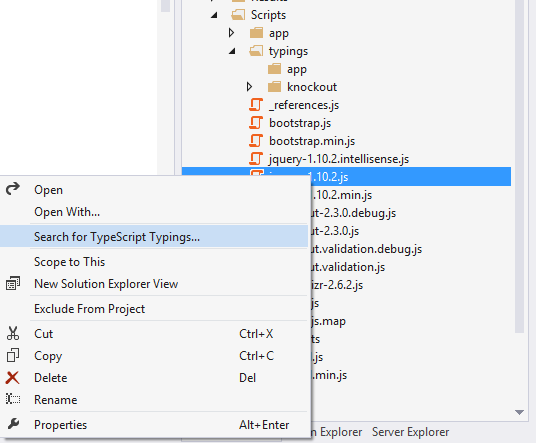
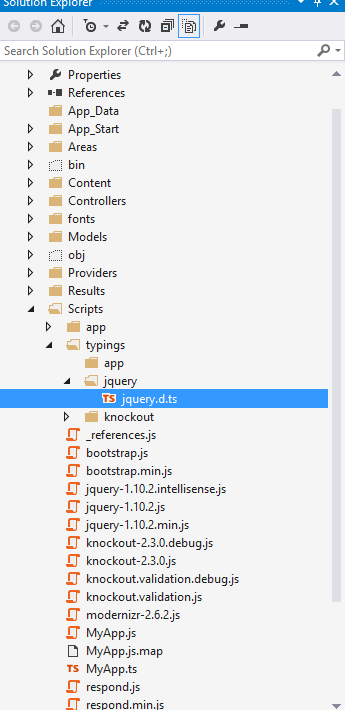
10. You can have question of how to use jquery inside my typescript code. You can't refer jQuery javascript file inside typescript file. Instead you have to create a typescript file for jQuery JS file by following way like how we would add nuget package.


Once you have created typescript file for jQuery, you can refer it in your own TYPESCRIPT file.

Definitely TYPESCRIPT will going to rock in future for Web/Mobile Application Development.


 You can get more information about typescript in below URL.

http://www.typescriptlang.org/


Sunday, March 10, 2013

Aspect Oriented Programming: Logging and Handling Exception using PostSharp


Today, I am going to explain on how to do logging and exception handling in aspect oriented programming using PostSharp. Suppose, if you want to find the execution time of each function, usually we would create two datetime variable, get the time at start and end of the method and find the difference at the end which would give execution time of method/function.
       
         In ASP.Net MVC, we can easily to do for controller actions by creating custom ActionFilterAttribute and overriding OnActionExecuting and OnActionExecuted methods. Same way, if you want to do for library class methods, you have to manually write code for each methods at start and end of the method. If we have to do for more no. of functions in library, its difficult to write code for each function which it turn difficult to manage.
      
       Traditionally, If you want to handle the exception and log the exception, you would use try catch block and handle the exception in catch block and log the error; and re-throw it again if needed. 

Aspect Oriented Programming (AOP):
      To handle the above situation easily, we can use aspect oriented programming (AOP). AOP can be implemented using several third party components like PostSharp, Sprint.Net AOP, etc. Here, I'm going to explain using PostSharp.

Requirements:
1. Log information at start and end of each method/function in class without writing code for each method in class.
2. Log error if function throws any error without writing exception logging in catch block of each method.

To experiment the above requirements, follow the below steps .

1. Install Postsharp from NuGet Packages.


2. For Logging, create a class Logger (You can name it whatever you want) and inherit the OnMethodBoundaryAspect class. Then overrride OnEntry and OnExit method to log the information like below.


using System;
using System.Collections.Generic;
using System.Linq;
using System.Text;
using PostSharp.Aspects;

namespace AOPSampleApp.Aspects
{
    [Serializable]
    public class Logger : OnMethodBoundaryAspect
    {
        public override void OnEntry(MethodExecutionArgs args)
        {
            //TODO Enter Logging.
            // Start the stop watch
            base.OnEntry(args);
        }

        public override void OnExit(MethodExecutionArgs args)
        {
            //TODO Exit Logging
            // stop the stop watch
            base.OnExit(args);
        }
    }
}

3. For Exception Handling, create a class ExceptionHandler (You can name it whatever you want) and inherit the OnExceptionAspect class. Then overrride OnException method to log the error like below.

using System;
using System.Collections.Generic;
using System.Linq;
using System.Text;
using PostSharp.Aspects;

namespace AOPSampleApp.Aspects
{
    [Serializable]
    public class ExceptionHandler : OnExceptionAspect
    {
        public override void OnException(MethodExecutionArgs args)
        {
            //TODO Exception Logging
            args.FlowBehavior = FlowBehavior.Continue;

            base.OnException(args);
        }
    }
}

4. Add above class (Logger and ExceptionHandler) as an attribute to any method where you want to handle the logging  at start, end of the method or handle the exception like below.

class Program
    {
        static void Main(string[] args)
        {
            Add();
            Divide();
        }

        [Logger]
        static void Add()
        {
            int a = 1, b = 2, c;
            c = a + b;
        }

        [ExceptionHandler]
        [Logger]
        static void Divide()
        {
            int a = 1, b = 0, c;
            c = a / b; // Dividing by Zero
        }


    }


Order of Execution for Above Code:

1. Call Add Method.
2. Execute OnEntry method of Logger before initialize a,b,c and calculate sum.
3. Execute the Add method.
4. Execute OnExit method of logger after completing the execution of Add method.
5. Call Divide Method.
6. Execute OnEntry method of Logger before before throwing exception in Divide method.
3. Execute the Divide method and throw an exception.
4. Execute OnException method of ExceptionHandler.
4. Execute OnExit method of logger after completing the execution of Divide method.
 
From the above, you could understand that we can easily handle the logging and exception using Postsharp.


Friday, February 22, 2013

Bundling and Compressing / Minifying Javascript and CSS files using Powershell Script


In ASP.Net MVC4, bundling and minification process for JS and CSS files is very simple. But in older version of project or open source project, you have to manually bundle and minify the Javascript and CSS files.
Here I am going to explain on how to do the above process using powershell script and Yahoo UI Compressor JAR file.

Why we need to BUNDLE the JS or CSS files?
If you are having multiple JS files in your project, multiple request sent to server to retrieve the files. If you have bundled the relative JS files into a single one, only one request sent to the server to retrieve the file.

Why we need to MINIFY the JS or CSS files?
Even if you have implemented the bundling of JS files, file size will be large and loading time will increase. If you have minified (removing unwanted space, lines and others) the JS files, file size reduced to small and less time take to load the JS file in browser.

And also, if you are using YSLOW for performance analysis, it will suggest you to do the bundling and minification.

Follow below steps to experiment the bundling and minification

1. Create two JS files (CustomerJS1.js, CustomJS2.js).

CustomJS1.js:


   1:  function showAlert1()
   2:  {
   3:      alert("testing combining and compression");
   4:  }

CustomJS2.js:
 
   1:  function showAlert2()
   2:  {
   3:      alert("testing combining and compression");
   4:  }


2. Make sure following software's installed in your system.

    a) Powershell
    b) Java JDK 7
    c) Download Yahoo UI Compressor JAR file


3. Use the below powershell script to create a bundled and minified file. please see the comments for each command of powershell to understand more on powershell script.

   1:   
   2:  #defining version
   3:  $version = "1.0";
   4:   
   5:  #creating new file. "-force" replaces new file if file already exists
   6:  New-Item "CustomJS-$version.js" -type file -force
   7:  New-Item "CustomJS-$version.min.js" -type file -force
   8:   
   9:  # Getting content from multiple custom JS files and put into a single version file.
  10:  # if your custom JS files and output files located in same directory, you have to exclude the output files. Otherwise you get access denied error.
  11:  Get-Content "Custom*.js" -Exclude "CustomJS-$version.js", "CustomJS-$version.min.js" | Add-Content "CustomJS-$version.js"
  12:   
  13:  #compressing JS files using Yahoo UI Compressor JAR file
  14:  java -jar yuicompressor-2.4.8pre.jar "CustomJS-$version.js" -o "CustomJS-$version.min.js"


4. After executing the above script in powershell, you can see the output of  bundled and minified files. Make sure YUI JAR file located in relative path while executing the powershell script.

CustomJS-1.0.js:

   1:  function showAlert1()
   2:  {
   3:      alert("testing combining and compression");
   4:  }
   5:  function showAlert2()
   6:  {
   7:      alert("testing combining and compression");
   8:  }


CustomJS-1.0.min.js:

   1:  function showAlert1(){alert("testing combining and compression")}function showAlert2(){alert("testing combining and compression")};


Powershell script for Bundling and Minification of CSS files :

   1:  #defining version
   2:  $version = "1.0";
   3:   
   4:  #creating new file. "-force" replaces new file if file already exists
   5:  New-Item "CustomCSS-$version.css" -type file -force
   6:  New-Item "CustomCSS-$version.min.css" -type file -force
   7:   
   8:  # Getting content from multiple custom CSS files and put into a single version file.
   9:  # if your custom CSS files and output files located in same directory, you have to exclude the output files. Otherwise you get access denied error.
  10:  Get-Content "Custom*.css" -Exclude "CustomCSS-$version.css", "CustomCSS-$version.min.css" | Add-Content "CustomCSS-$version.css"
  11:   
  12:  #compressing CSS files using Yahoo UI Compressor JAR file
  13:  java -jar ..\JAR\yuicompressor-2.4.8pre.jar "CustomCSS-$version.css" -o "CustomCSS-$version.min.css"


Saturday, December 29, 2012

Best practices to reduce memory leak in jQuery/Javascript


1. if you want to remove HTML DOM elements,  follow the below  steps to release memory claimed by DOM elements.

a) $("#content").off();   // unbind all the events of that control.
b) $("#content").empty(); or   $("#content").html("");  // -- Remove the child elements before removing the element itself.
c) $("#content").remove();  // -- remove the element itself.

2. Before removing the element, please follow the above three steps for each child element from lower level to higher level.

3. if you have used any variable to store the values, follow below steps to release memory claimed by variable.

delete x;  // x is variable
x = null;

4. if your plugin has functions or properties, please set it to null.

[object].sortable = null;

Thursday, December 06, 2012

Solution: Replacing jQuery attr onclick event not working in IE (Internet Explorer) Browser


Before IE 9, if you are replacing HTML element onclick attribute using jquery, the event won't fire. See below HTML and jQuery to replace the onclick attribute of anchor tag.

HTML:

   <div>  
     <a id="atest" style="cursor:pointer" onclick="showAlert1();"> Click to fire an event</a>  
   </div>  


jQuery:


  <script type="text/javascript">  
     $(function () {  
       $("#atest").attr("onclick", "showAlert1();showAlert2();");  
     });  
     function showAlert1()  
     {  
       alert("Alert 1");  
     }  
     function showAlert2() {  
       alert("Alert 2");  
     }  
   </script>  

Above jQuery, replacing the onclick attribute to show the two alert instead of single alert. This code won't work in IE 7/8 browser. To fix this, you can bind a custom click event using click method in jQuery.


  <script type="text/javascript">  
     $(function () {  
       $("#atest").click(function () { showAlert1(); showAlert2(); });  
     });  
     function showAlert1()  
     {  
       alert("Alert 1");  
     }  
     function showAlert2() {  
       alert("Alert 2");  
     }  
   </script>  

In some cases, you may have to replace the onclick attribute with your own custom attribute based on some logical situation. In that case,it's not easy to bind click event dynamically. Here is the magic to replace the entire anchor element with custom attribute anchor element.

  <script type="text/javascript">  
     $(function () {  
       var onc = $("#atest").attr("onclick");  
       var elemHTML = $("#atest").parent().html();  
       var finalElement = elemHTML.replace(onc, onc + "showAlert2();");  
       $("#atest").parent().html(finalElement);  
     });  
     function showAlert1()  
     {  
       alert("Alert 1");  
     }  
     function showAlert2() {  
       alert("Alert 2");  
     }  
   </script>  

Tuesday, October 25, 2011

SQL SERVER – SHRINK Log File using SHRINKFILE

if you want to shrink the log file, you would use SHRINKFILE command like.

DBCC SHRINKFILE(TestDBLog, 1)
GO


But in some cases (like production database), if you shrink log file by using above command, you won't get expected result. So, if you want to shrink log file to minimum size, take backup (*.bak) of entire database with SIMPLE recovery mode and then run the shrink file command.

Here is the code to backup the database and shrink the log file

BACKUP DATABASE [TestDb] TO DISK = N'C:\TestDb.bak'
GO
DBCC SHRINKFILE(TestDBLog, 1)
GO

Monday, August 30, 2010

Clearing ASP.Net FileUpload Control using jQuery

Here i am going to discuss about on how to clear the file upload control using jQuery. To clear file upload control, you have to place file upload control within the DIV tag like below.

HTML CODE:


<div id="div_fileupload">
<asp:FileUpload ID="fileUpload" runat="server" onkeypress="return false;" />
</div>


jQuery Custom Function:


// Clearing text of file upload control by means of replacing with HTML content.
// you can place this code in your JS file.
$.ClearFileUpload = function (fileUploadControlId) {
try {
document.getElementById(fileUploadControlId).innerHTML = document.getElementById(fileUploadControlId).innerHTML;
$(fileUploadControlId).focus();
} catch (e) {
//alert(e.Description);
}
}


Calling jQuery Custom Function from ASP.Net Design View:


function Checkfiles() {
var value = $('#fileUpload').val().toLowerCase();
if (value.length != 0) {
if (/.*\.(gif)|(jpeg)|(jpg)|(png)$/.test(value))
return true;

$.ClearFileUpload('div_fileupload');
alert('Please Upload Gif or Jpg Images, or Png Files Only.');
return false;
}
else {
return true;
}
}

You can call the above function in your ASP.Net Submit button OnClientClick event with checking the file extensions.

Wednesday, June 25, 2008

Solution: Session Timeout not working on Production Server in ASP.Net

Problem:

You may faced the session timeout problem on production web server after deployed the ASP.Net Web Application. Even after you have changed the Web.Config setting like

<sessionState mode="InProc" cookieless="false" timeout="300"/>


Session will get lost after default session timeout duration (20 Minutes).

You may also have tried to change the default session timeout value in IIS (Internet Information Server).

In all the above cases, session timeout value is lost after 20 Minutes (default session timeout value).


Solution:


Here is the solution to maintain the session for long period (above 20 minutes) on Production Web Server. To maintain the session, we have to refresh the website atleast before 20 minutes (e.g every 10 minutes). To refresh the website, here is the tricky solution.

ASP.Net 2.0 Web Project:

Instead of refreshing each ASPX page, we can achieve this with single webform.
Add a new webform (RefreshASPXToKeepSessionAlive.aspx) in the web project. Add the metatag information within HEADER of this web page.
E.g.

<head runat="server" >
<meta http-equiv="refresh" content="600" />
<title>Poll this page from master page to keep session alive</title>
<head>

The above META tag information says refresh the page for every 600 seconds (10 Minutes).

Master Page:

You have to call the above created page from MASTER PAGE. you can call this without affecting other web forms master design, use the hidden iframe logic like.


You have to use above iframe HTML tag outside the content placeholder.

The above technique refresh the RefreshASPXToKeepSessionAlive.aspx page from master page for every 20 Minutes. So, website will maintain the session for long period (greater than 20 Minutes) without losing.

if you got any problem on using the IFRAME tricks, add the iframe tag dynamically in HTML view instead of adding that in design time.

E.g.

<%
if (Session["IsUserLogged"] != null && ((bool)Session["IsUserLogged"]) == true)
{
Response.Write("<iframe src ='RefreshASPXToKeepSessionAlive.aspx' style ='display:none'></iframe>");
}
%>

Tuesday, September 04, 2007

Randomly selecting records from the Table - SQL Server

If you would like to retrieve the 10 records randomly, you have to use either RAND() or NEWID() function.

RAND():
------
SELECT TOP 10 EmployeeID, RAND() AS RNumber FROM dbo.Employee ORDER BY 2


NEWID():
--------
SELECT TOP 10 EmployeeID FROM dbo.Employee ORDER BY NEWID()


The above 2 methods of retrieving the records from the table have own mertis and demerits.

RAND() methods will give same sample of records in every run. so you have to come with own logic to produce different random number for every records.

NEWID() method give easy solution for the above problem. The idea behind this method is having of unique identifier for each rows. SQL Server maintain this for every rows.

There will be performance overhead problem in this approach when you are using this for TABLE having more records. Because its scans through whole table. you can avoid the full scan by limiting the records using WHERE condition.

SQL Server 2005.
---------------

SQL Server 2005 provides new option to get the records randonly. That new option is
TABLESAMPLE. This keyword is used with FROM clause. This approach could not read
through entire table. its just take the sample records instead of scanning entire
table.

TABLESAMPLE:
------------

SELECT EmployeeID FROM dbo.Employee TABLESAMPLE (50 ROWS)

SELECT EmployeeID FROM dbo.Employee TABLESAMPLE (50 PERCENT)

SELECT TOP 10 EmployeeID FROM dbo.Employee TABLESAMPLE (50 ROWS)


The above first query will not return 50 rows exactly.
First it will convert the ROWS into percent. And the select the records randomly.

Selection of random records based on DATA pages(8K) for that table instead of rows identifier. so it will not produce the expected result.

To get the expected result, we have to use the TOP clause in the select query. The TOP #(number) should be less than selection of records specified in the TABLESAMPLE.

Sometimes,Even this appraoch will not produce the expected result.so you have to use this approach carefully with your logic.

Wednesday, May 30, 2007

Passing a Table to A Stored Procedure in SQL Server 2005

In this article, he trying to present a solution to the above scenario by using XML as the format to pass a table to a stored procedure. The CALLER can transform the table (Query result) to an XML variable and pass to the stored procedure. The CALLEE can either convert the XML parameter back to a TABLE variable or directly use XQuery on the XML variable. more