In this video, I talk about 1. how to communicate between components using service with subject. Github: https://github.com/ayyanarjayabalan/communicationbetweencomponent
Saturday, February 22, 2020
[Video Tutorial]: Communication between components using service with subject
In this video, I talk about 1. how to communicate between components using service with subject. Github: https://github.com/ayyanarjayabalan/communicationbetweencomponent


Friday, February 21, 2020
[Video Tutorial]: Communication between parent and child component in angular
In this video, i talk about, 1. how to interact between parent and child component using @Input and @Output decorator.
Github: https://github.com/ayyanarjayabalan/communicationbetweencomponent
[Video Tutorial]: Resolver in Angular
In this video, I talk about 1. when to use the route resolver. 2. how to implement the resolver in angular. Github: https://github.com/ayyanarjayabalan/preloadingstrategy
[Video Tutorial]: Network Aware Preloading Strategy in Angular
In this video, I talk about 1. defining preloading strategy based on internet speed of your network. 2. if the network speed is 2g, no need to preload the modules. 3. if the network speed is 3g/4g, preload the modules. 4. how to implement the preloading strategy in angular based on network speed.
Preloading Strategy: https://www.youtube.com/watch?v=kcGShnGg0ms
Custom Preloading Strategy: https://www.youtube.com/watch?v=eMIPiJtaj60
Github: https://github.com/ayyanarjayabalan/preloadingstrategy
Wednesday, February 19, 2020
[Video Tutorial]: Custom Preloading Strategy in Angular
In this video, i talk about 1. When to use custom preloading strategy.
2. how to implement custom preloading strategy.
3. how to preload modules with some delay.
4. where to specify preloading flag and delay flag in route.
Below video is to understand the preloading strategy in angular.
Below video is to understand the custom preloading strategy in angular.
[Video Tutorial]: Preloading strategy in angular application
In this video, I talk about, 1. Purpose of preloading strategy.
2. Difference between lazy and pre loading.
3. When we have to go for preloading strategy
4. how to define the preloading strategy
5. Explain the types of preloading strategy
[Video Tutorial]: Lazy loading of module in angular 9
In this video, I talk about 1. what is lazy loading in angular
2. how lazy loading helps to improve the performance of angular application
3. how to implement module level lazy loading in angular 9.
[Video Tutorial]: How to create custom directive in angular
In this video, I talk about 1. Types of directives
2. How to create a custom directive to change the appearance of html element
[Video Tutorial]: How to create custom pipe in angular
In this video, I talk about 1. Purpose of directives.
2. how to create custom pipe in angular
Monday, February 17, 2020
[Video Tutorial]: Upgrade existing angular application and angular cli to angular 9
In this video, i talk about
1. How to upgrade existing angular 8 application to angular 9 version. 2. How to upgrade ANGULAR CLI (@angular/cli) to version 9.
Saturday, February 15, 2020
[Video Tutorial]: Differential loading in angular application to support both modern and older browsers
In this video, i talk about 1. how angular cli generate bundles to support both modern and older browsers. 2. how tsconfig file changes impacting the generation of bundles. 3. how browserlist file changes impacting the generation of bundles. 4. how browser loading the respective files instead of loading all the files. 5. why angular cli not combining both es5 and es2015 files.
Youtube Channel: https://www.youtube.com/channel/UC_QTyKv3TLUGFOQPYXd0Wfg
Friday, February 14, 2020
[Video Tutorial]: In Angular, How to change title of the browser while navigating to different components
In this video, i talk about 1. how to change the title of browser while navigating to different component using title service in @angular/platform-browser, router events, Activated Route. 2. how to change the title of browser while navigating to child level component. GitHub: https://github.com/ayyanarjayabalan/changebrowsertitle
Youtube Video: https://youtu.be/8iWAChl3rCQ
Tuesday, February 11, 2020
[Video Tutorial]: Create angular library, publish it to NPM repository and then consume it.
In this video, I'm talking about 1. How to create angular library. 2. How to publish it npm repository (npmjs.com) 3. How to consume the published library in another angular application.
[Video Tutorial]: Understanding Angular Workspace Configuration File (angular.json)
In this video, you can understand 1. How to create angular workspace configuration file (angular.json) 2. How to create multiple projects like angular application and library. 3. How to change the customize the ng generate command. 4. How to change the prefix of component selector. 5. What is builder and its configuration. 6. How to specify application specific tsconfig settings.
Sunday, February 09, 2020
[Video Tutorial]: RxJs Subject - Subject, BehaviorSubject, ReplaySubject, AsyncSubject
Subject:
Subscriber will receive data of newly emitted value from subject and won’t receive data which is already been emitted by subject before subscription. BehaviorSubject: Subscriber will receive initial data supplied by subject or recent value emitted by subject. ReplaySubject: Every new subscriber will receive set of recent values emitted by subject based on buffer size. AsyncSubject: All subscriber will receive recent value only after completion of Observable subject. JsFiddle: https://jsfiddle.net/ayyanarj/d9qr1Lch/33/
Youtube: https://youtu.be/5foQB5Qpock
Youtube Channel: https://www.youtube.com/channel/UC_QTyKv3TLUGFOQPYXd0Wfg/
Saturday, February 08, 2020
[Video Tutorial]: RxJs Operators - zip, combineLatest, withLatestFrom, forkJoin
RxJs Operators - zip, combineLatest, withLatestFrom, forkJoin
In below youtube video, i have explained the rxjs operators of zip, combineLatest, withLatestFrom and forJoin. And also, explained the differences between these four operators.
In below youtube video, i have explained the rxjs operators of zip, combineLatest, withLatestFrom and forJoin. And also, explained the differences between these four operators.
Thursday, January 16, 2020
Covert blob to string in Javascript to support in IE (Internet Explorer) browser
If you would like to covert stream of bytes (blob) to string in client side, you can easily done with below few lines of code using text() method.
Above code does not work in IE browser. if you see below table, you can understand the syntax supported by each browser.

So, above text() method won't work in IE browser. To fix this, we can FileReader to read the blob value. we have to attach "loadend" event to FileReader which will get triggered after read completed. Once read completed, we can get the completed blob object into string. please refer the below code.
 // Easy way
 var blb = new Blob(["Lorem ipsum sit"], {type: "text/plain"});
 var strValue = '';
 new Response(blb).text().then(t => {
 console.log(t);
 });
Above code does not work in IE browser. if you see below table, you can understand the syntax supported by each browser.

So, above text() method won't work in IE browser. To fix this, we can FileReader to read the blob value. we have to attach "loadend" event to FileReader which will get triggered after read completed. Once read completed, we can get the completed blob object into string. please refer the below code.
 // IE FIX
 var  blb = new Blob(["Lorem ipsum sit - IE FIX"], {type: "text/plain"});
 var strValue = '';
 const readText = (blobString) => {
  console.log(blobString);
 }
 // Since IE not supporting text(), we are using FileReader to convert the blob to string.
 const showLocalError = this.showError;
 const reader = new FileReader();
 // this event get triggered once read from blob is completed. once loadend event triggered, we can retrieve the value.
 reader.addEventListener('loadend', function () {
  if (reader && reader.result) {
      readText(reader.result.toString());
  } else {
      console.log('Error in converting blob to string');
  }
 });
 // using readAsText, we are start to reading the blob. Once reading completed, loadend event will get trigged
 reader.readAsText(blb);
Wednesday, November 14, 2018
DIY: Landscape at front of my house (Using Natural Grass)
While constructing the house itself, I've decided that front side of the house should be in greenish which would beautify the house and give a WOW factor to my house. After few months of house warming, we start to plant vegetable plants like pepper, brinjal, etc. But I'm not satisfied with that. Because intention of space allocated at front side of the house is to look good and more greenish. To make my dream in real, I've started to remove all the plants (though my dad was not happy).
Steps:
1. Bought Bangalore grass from local vendors. (Rs. 30 per Sq.ft.)
2. Poured natural fertilizer over the sand.
3. Flattened the sand surface.
4. Sprinkled the water and flattened again.
5. Paved the grass over the area one by one.
6. After paved, we have to sprinkle the water over the grass two times for two weeks until becomes greenish.
7. After that, one time water sprinkle in enough.
8. Continuous maintenance is required to maintain the landscape in greenish.
Photos:


Steps:
1. Bought Bangalore grass from local vendors. (Rs. 30 per Sq.ft.)
2. Poured natural fertilizer over the sand.
3. Flattened the sand surface.
4. Sprinkled the water and flattened again.
5. Paved the grass over the area one by one.
6. After paved, we have to sprinkle the water over the grass two times for two weeks until becomes greenish.
7. After that, one time water sprinkle in enough.
8. Continuous maintenance is required to maintain the landscape in greenish.
Photos:


Flutter: Installation and setup
Flutter is an open source framework (developed by Google) for building native mobile apps for Android and iOS using DART language. React Native (open source framework for building native mobile app for android and iOS using JS/TS language) is developed by Facebook.
Installation(for Windows):
1. Git
2. Powershell (Installed with Windows)
3. Java JDK
4. Android Studio (with AVD)
5. Visual Studio Code
5. Flutter
Install the above softwares by clicking the link.
Run the (flutter_console.bat) under flutter directory and run the below command which tells list of softwares required is been installed or not.
Android Studio Installation Error (Installer integrity check has failed):
if you receive the error (Installer integrity check has failed) while installing the android studio using exe file, try to download RAR file and install.
Or
open the command prompt, run the exe file with switch like below.
C:\Users\ayyanar.jayabalan\Downloads\android-studio-ide-181.5056338-windows.exe /NCRC
flutter doctor

After installing the android studio, install flutter and dart plugin.
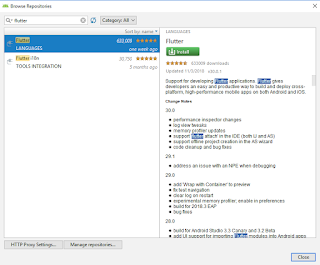
flutter doctor
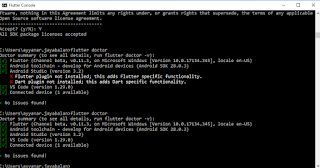
Now you have installed all required softwares to start to work flutter.
Setup:
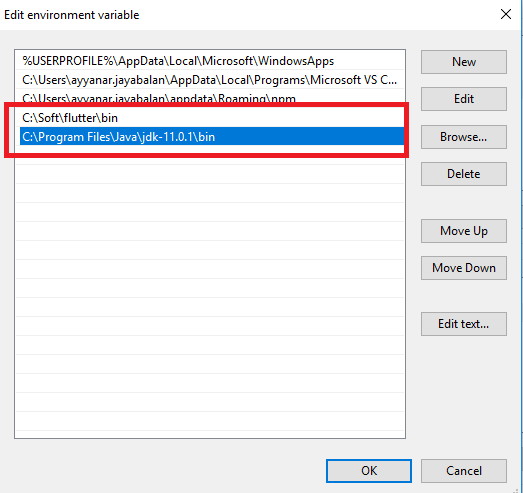
1. Setting up the JDK Path in environment variables.
2. Setting up the Flutter Path in environment variables.
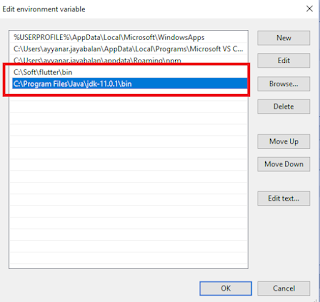
Installation(for Windows):
1. Git
2. Powershell (Installed with Windows)
3. Java JDK
4. Android Studio (with AVD)
5. Visual Studio Code
5. Flutter
Install the above softwares by clicking the link.
Run the (flutter_console.bat) under flutter directory and run the below command which tells list of softwares required is been installed or not.
Android Studio Installation Error (Installer integrity check has failed):
if you receive the error (Installer integrity check has failed) while installing the android studio using exe file, try to download RAR file and install.
Or
open the command prompt, run the exe file with switch like below.
C:\Users\ayyanar.jayabalan\Downloads\android-studio-ide-181.5056338-windows.exe /NCRC
flutter doctor

After installing the android studio, install flutter and dart plugin.
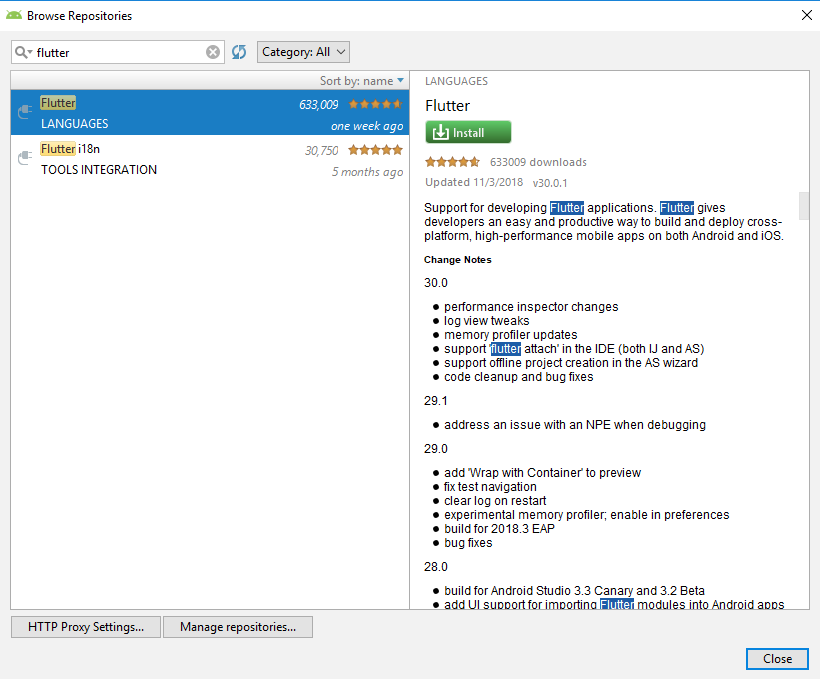
flutter doctor
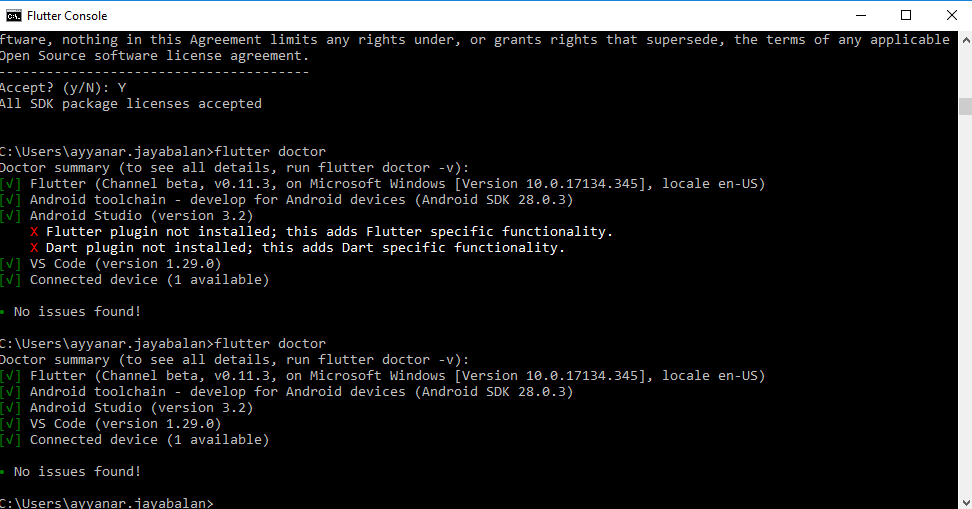
Now you have installed all required softwares to start to work flutter.
Setup:
1. Setting up the JDK Path in environment variables.
2. Setting up the Flutter Path in environment variables.
Monday, November 12, 2018
Upgrade angular version from 6 to 7
To upgrade the angular version in your project, please use below commands to upgrade the angular version.
ng update @angular/cli
ng update @angular/core
ng update @angular/cli
ng update @angular/core
Subscribe to:
Posts (Atom)


